What is WebAuthn?
Web Authentication (WebAuthn) is a core component of the FIDO2 (Fast IDentity Online) standard, developed by the FIDO Alliance and the World Wide Web Consortium (W3C). WebAuthn eliminates the reliance on passwords by leveraging public key cryptography. It allows users to authenticate using more secure methods, such as biometrics (fingerprint or facial recognition) or hardware security keys.
At its core, WebAuthn works by:
- Generating a unique key pair (public and private keys) for every service or application.
- Storing the private key securely on the user’s device.
- Sending the public key to the server for authentication.
The server never has access to the private key, reducing the risk of credential theft during breaches.
The Rise of Passkeys
Passkeys build upon the WebAuthn standard to create a seamless, user-friendly authentication experience. A passkey is a passwordless credential tied to a device and secured through biometric or PIN-based verification. It eliminates the need for users to remember complex passwords while maintaining robust security
Passkeys work by synchronizing between devices via cloud storage—like Apple’s iCloud Keychain or Google Password Manager—ensuring accessibility across platforms while maintaining strong encryption and privacy controls.
Why Passkeys and WebAuthn?
Enhanced Security
- Protection Against Phishing: Passkeys and WebAuthn are resistant to phishing attacks because they rely on domain-bound credentials that cannot be reused on malicious websites.
- Elimination of Passwords: By removing passwords entirely, these technologies mitigate risks from weak, reused, or compromised credentials.
Improved User Experience
- Ease of Use: Users no longer need to create or remember passwords. Authentication becomes as simple as scanning a fingerprint or using facial recognition.
- Cross-Platform Support: Passkeys work seamlessly across devices, making the user experience consistent and hassle-free.
Compliance and Privacy
- WebAuthn is designed to comply with global data protection regulations. User credentials are stored locally on devices, ensuring privacy and reducing centralized storage risks.
Devices Compatible with Passkeys
Passkeys are compatible with a wide range of modern devices equipped to handle FIDO2/ WebAuthn standards. Smartphones, particularly Android and iOS devices, are highly feasible due to their robust security features, including secure hardware like Android’s Secure Element and iOS’s Secure Enclave for storing cryptographic keys. These devices also feature built-in biometric authentication, such as fingerprint or facial recognition, enabling seamless, secure, and user-friendly passwordless authentication. In addition to smartphones, tablets and laptops with secure hardware (e.g., Secure Enclave, TPM) and biometric capabilities are common choices. Dedicated physical options like hardware security keys (e.g., YubiKey, Google Titan) provide enhanced security for sensitive environments. Furthermore, desktops with compatible biometric devices and cloud-based platforms like iCloud Keychain and Google Password Manager extend passkey functionality, offering cross-platform synchronization and accessibility for modern digital interactions.
Key Components in Passkey Authentication
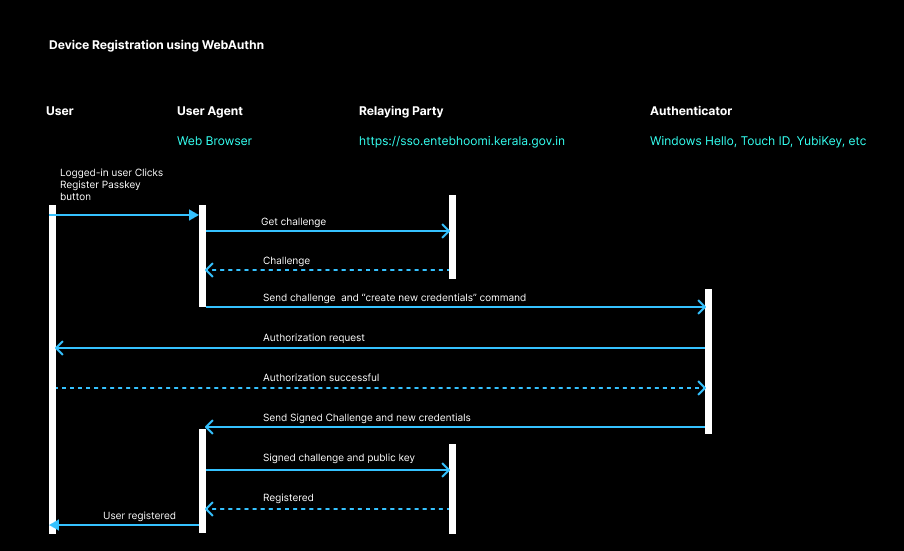
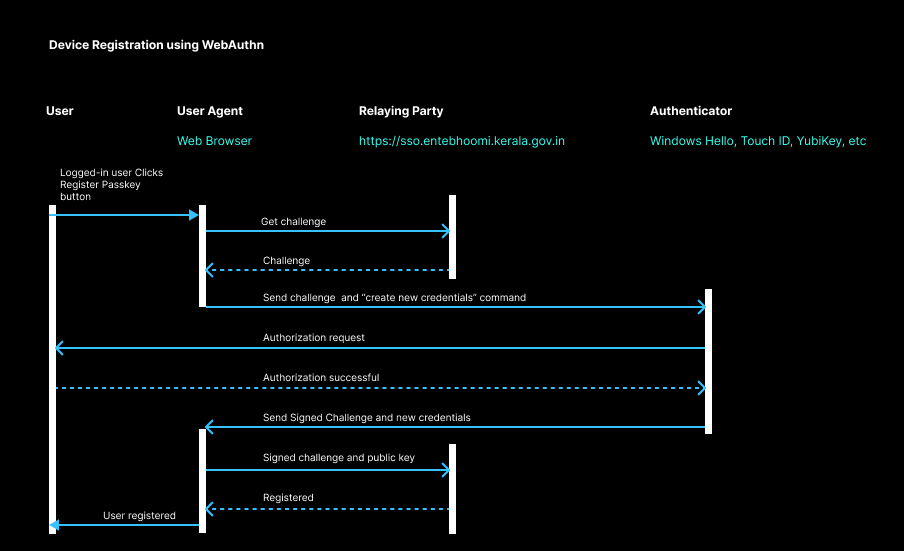
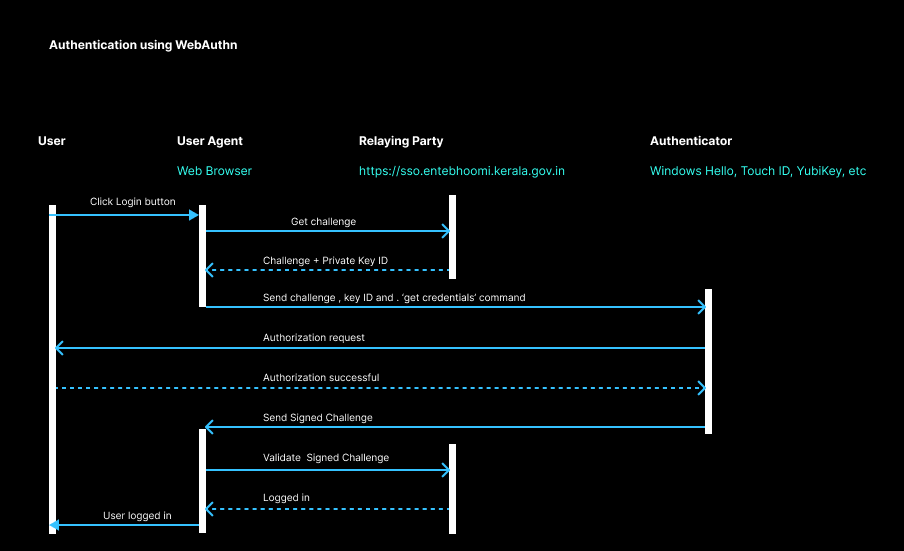
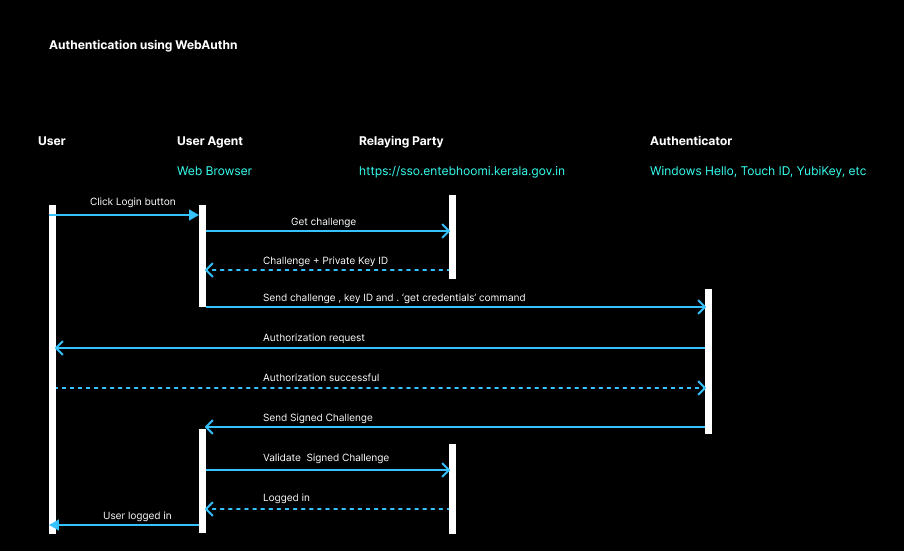
Passkey authentication involves four critical components working seamlessly together: the user, user agent, relying party, and authenticator
- User: The individual who initiates the authentication process by interacting with a service or application. The user provides a biometric input (e.g., fingerprint or facial recognition) or a PIN to verify their identity.
- User Agent: This is typically the web browser or application acting as an intermediary between the user and the service. Popular user agents include browsers such as Google Chrome, Microsoft Edge, Mozilla Firefox, and Apple Safari. The user agent handles communication with the relying party and interacts with the authenticator to facilitate secure authentication. These web browsers provide built-in support for WebAuthn through JavaScript APIs. These APIs enable seamless integration of passwordless authentication into web applications, allowing developers to securely register and authenticate users using Passkeys
- Relying Party: The service or application requesting authentication (e.g., a government portal like Entebhoomi). The relying party stores the public key generated during passkey registration and uses it to verify the user’s authentication response.
- Authenticator: The device or system that securely generates and stores cryptographic keys. Examples include:
- Built-in Authenticators: Modern devices such as iPhones, Android smartphones, Windows laptops (with Windows Hello), and macOS devices (with Apple Secure Enclave) that securely handle authentication.
- External Authenticators: Hardware security keys like YubiKey, Google Titan Key, or Feitian keys that connect via USB, NFC, or Bluetooth.
- Cloud-based Authenticators: Services like Apple’s iCloud Keychain, Google Password Manager, and Microsoft Authenticator that enable synchronized Passkeys across multiple devices.
These components, supported by industry leaders like Apple, Google, and Microsoft, work together to deliver a seamless, secure, and passwordless authentication experience. This ensures robust security while maintaining ease of use for end users in modern digital interactions